digital measure
        measuring system
banner banner banner

 
IR Measure Schematic Download  Contact us
tab
Units:
Voltmeter
Freq. counter
LC meter
IR receiver
 

Screenshots
 IRMeasure GUI and skins.

Infrared communication
Reliability of infrared communication.

FAQ
Frequently question.

About Us
IRMeasure team..


Articles
Related articles.


  IRMeasure - modular measuring system

tab
 
IRMeasure is a universal measurement system that allows you to measure various electrical values (voltage, current, LC, frequency and more) at the same time. Results of these measurings are being transmitted wirelessly to your PC, where they are displayed on your monitor instantly. All measured data can as well be logged into files.

tab

IRMeasure supporting units :  LC Meter,  Frequency Counter ,  Volt Meter.

Overview

IRMeasure system is based on measuring devices - called units that transmit the data you measure to the PC. Windows application called IRMeasure takes care of displaying your measured data on the screen and allows you as well to log measured data to a file. 

Since your measured data are displayed on PC monitor instantly, individual units do not need to contain a display and thus are very small in size. 

IRMeasure - feature list
  • units are very small
  • units are separated from the PC 
  • up to 15 units can work simultaneously
  • measurements can be stored on your computer
  • system is modular and the number of units will be increased
  • the attached software enables comfortable measuring


System description

You can use up to 15 different units at the same time which gives you the possibility to measure multiple values at once and see the results of all the measurings immediately on your PC monitor. 

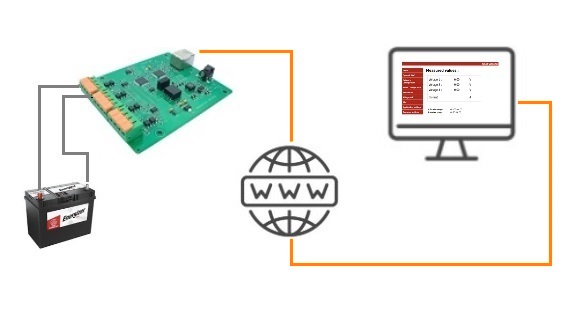
schematic

When you use the IRMeasure kit you always need: 1 IRMeasure Receiver (that is the device that is connected by USB or serial COM port with your PC) and multiple devices called "units" - that perform the actual measurings (like Volt Meter, Frequency Counter, LC Meter and more).

IRMeasure Receiver and the individual units communicate with each other wirelessly so there is no a risk of damaging your PC by the circuit you measure. No matter how many units you use, your PC is connected to (and always occupies) only one USB or COM port since all units communicate with IRMeasure Receiver wirelessly - and only IRMeasure Receiver is connected to your PC.

You can choose which units you want to use based on your needs. You can also use more units of the same type more than once if you are interested in measuring multiple values (e.g. voltage) at the same time on different places/circuits.

tab
The system is designed for indoor usage and the distance between the PC and the units should be up to 4 meters.
tab


Data is sent from units to PC around 12 times per second. Current consumption of individual units can be reduced on the cost of lower transmitting speed (this can be configured in the IRMeasure application).

IRMeasure application              icon   / Win XP, Win 2000, Win 98 /           FREE demo version download

IRM GUI IRMeasure software is the integral component of IRMeasure system. It's role is to receive data from individual units and display them on PC monitor.

This software solution is designed to be universal and it is possible to
extend it with additional functionality. The IRMeasure PC application allows to configure all relevant parameters of individual units.

The hardware that has to be attached to the PC (called IRMeasure Receiver) can be connected with PC either by USB or a standard serial port (RS232). IRMeasure allows switch between USB and serial receiver anytime. 

Up to 15 different units can IRMeasure display simultaneously (in this picture are 4 units). You can also download the free demo version of IRMeasure from here.

It is also possible to enable logging to CSV files (regular text files) and open such files for instance in MS Excel. 
Logging is performed especially for each unit. Data filtering an individual settings are possible too.
log file

In case you are interested in IRMeasure system please contact us.


 © Copyright 2006. digital-measure.com